Show the code
library(openMIPD)
library(dplyr)
library(ggplot2)
library(here)
library(tidyr)
library(stacks)library(openMIPD)
library(dplyr)
library(ggplot2)
library(here)
library(tidyr)
library(stacks)The data is preprocessed to have the log-transformed daily dose as target variable which allows to reach the target concentration and the data is stratified based on dosing scheme.
# Import or generate training and test data
here::i_am("MIPD/Machine_Learning.qmd")

# Create folder to store published figures
if (!dir.exists(here("Figures"))) {
  dir.create(here("Figures"))
}

AMOX_CMIN_TRAIN <- read.csv(here("Data/AMOX_CMIN_TRAIN.csv"), quote = "")

AMOX_CMIN_TEST <- read.csv(here("Data/AMOX_CMIN_TEST.csv"), quote = "")

# The interdose interval column has to be called II
train <- AMOX_CMIN_TRAIN %>%
  dplyr::filter(REFERENCE == 1) %>%
  mutate(II = FREQ)

test <- AMOX_CMIN_TEST %>%
  dplyr::filter(REFERENCE == 1) %>%
  mutate(II = FREQ)

# machine learning function from the package
train_preprocessed <- ml_data_preprocess(data = train, target_variable = "CMIN", target_concentration = 60)
test_preprocessed <- ml_data_preprocess(data = test, target_variable = "CMIN", target_concentration = 60)explore_predictions <- function(data, conc_inf = 40, conc_sup = 80, DOSE_PRED) {
dose_pred_col <- sym(DOSE_PRED)
# Calculate true dose range and prediction correctness
data <- data %>%
mutate(
DOSE_inf = (conc_inf / CMIN_IND) * DOSE_ADM,
DOSE_sup = (conc_sup / CMIN_IND) * DOSE_ADM
) %>%
mutate(
Prediction_correctness = ifelse(
(!!dose_pred_col >= DOSE_inf & !!dose_pred_col <= DOSE_sup),
"Correct", "Incorrect"
)
) %>%
drop_na(Prediction_correctness) %>%
mutate(
Dosing = case_when(
Prediction_correctness == "Correct" ~ "On target",
!!dose_pred_col < DOSE_inf ~ "Underdosed",
!!dose_pred_col > DOSE_sup ~ "Overdosed"
)
)
# Proportions of under- and overdosing
dosing <- data %>%
count(Dosing) %>%
mutate(
Proportion = n / sum(n) * 100,
Dosing = factor(Dosing, levels = c("Overdosed", "On target", "Underdosed")),
Label = paste0(Dosing, "\n", round(Proportion), "%")
)
# Over/underdosed graph
p1 <- ggplot(dosing, aes(x = "", y = Proportion, fill = Dosing)) +
geom_bar(stat = "identity", width = 0.5) +
geom_text(aes(label = Label), position = position_stack(vjust = 0.5), color = "white", size = 5) +
scale_fill_manual(values = c("Underdosed" = "darkorange", "On target" = "chartreuse4", "Overdosed" = "#A91A27")) +
labs(y = "%", x = NULL, title = "Target attainment", fill = "Dosing Category") +
theme_minimal() +
theme(
axis.text.x = element_blank(),
axis.ticks.x = element_blank(),
plot.title = element_text(size = 20),
axis.text = element_text(size = 16),
axis.title = element_text(size = 20),
legend.position = "none"
) +
scale_y_continuous(breaks = seq(0, 100, by = 10)) +
coord_cartesian(ylim = c(0, 100))
# Summary statistics
summary_stats <- data %>%
group_by(Prediction_correctness) %>%
summarise(
Count = n(),
Obese = sum(WT / (HT / 100)^2 > 30, na.rm = TRUE),
mean_CREAT = mean(CREAT, na.rm = TRUE),
sd_CREAT = sd(CREAT, na.rm = TRUE),
mean_WT = mean(WT, na.rm = TRUE),
sd_WT = sd(WT, na.rm = TRUE),
mean_AGE = mean(AGE, na.rm = TRUE),
sd_AGE = sd(AGE, na.rm = TRUE)
) %>%
mutate(Proportion = Count / sum(Count))
correct_proportion <- summary_stats %>%
dplyr::filter(Prediction_correctness == "Correct") %>%
pull(Proportion)
message(sprintf("Proportion of 'correct' predictions: %.2f%%", correct_proportion * 100))
return(list(
target_attainment = p1,
summary_stats = summary_stats
))
}For ML, algorithms are trained on covariates to predict the daily dose which allows to reach a concentration of 60 mg/L. The target dose is obtained by linear extrapolation to attain 60 mg/L. For intermittent infusion, the daily dose is fractioned by the number of administrations. The predictors are the covariates (WT, CREAT, BURN, OBESE, ICU, SEX, AGE) as well as the dosing scheme coded as the number of daily administrations (INF - 1 for continuous infusion).
The tidymodels workflow is used which is incorporated in a fit-for-purpose way in our openMIPD package.
XGBoost is based on decision trees and the boosting algorithm, developing trees sequentially to correct the prediction errors of previous trees. Model overfitting is controlled by incorporating Lasso (L1) and Ridge (L2) algorithms. XGBoost is faster and has better computational efficiency compared to Random Forest. While XGBoost is less interpretable, it is better suited for larger datasets than Random Forest. Whereas Random Forest helps reduce variance, XGBoost primarily reduces bias.
The hyperparameters to define are as follows:
η – learning rate (default: 0.3)
γ – the minimum loss required for a new split; if increased, the algorithm becomes more conservative
max depth – tree depth (typical values range from 3 to 10)
minimum child weight - minimum number of observations in the terminal node
λ/α – regularization parameters for Ridge/Lasso
max levels – maximum number of nodes
XGB_results <- openMIPD::xgb_train(train = train_preprocessed, continuous_cov = c("WT", "CREAT", "AGE", "INF"), categorical_cov = c("BURN", "OBESE", "SEX", "ICU"))A variable importance plot is generated which show the contribution of different predictors to the results. Also, the tuning and hyperparameter optimization is visualized.
XGB_results$tune_plot_xgb # tuning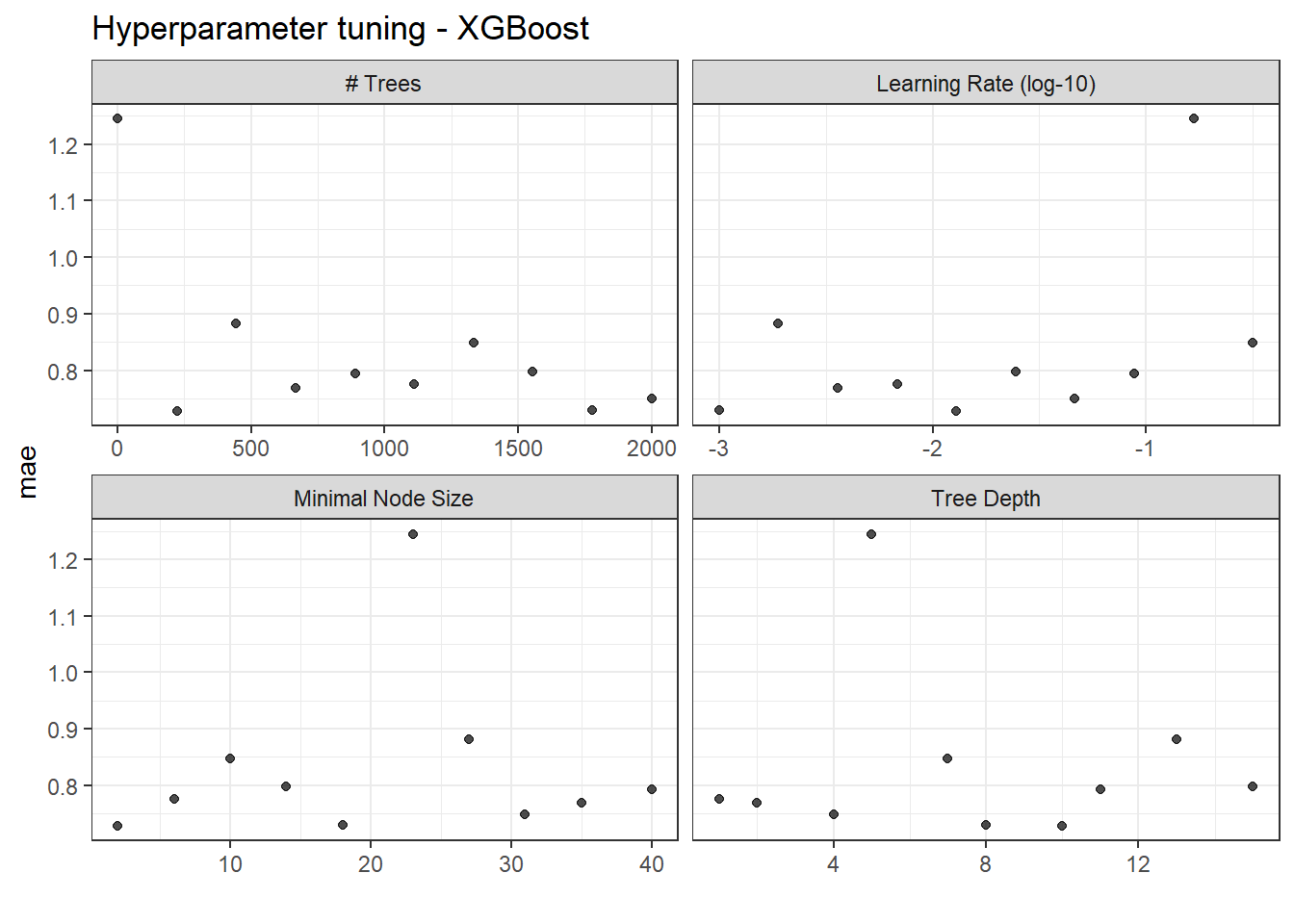
XGB_results$final_wf_xgb # optimized hyperparameters══ Workflow ════════════════════════════════════════════════════════════════════
Preprocessor: Recipe
Model: boost_tree()
── Preprocessor ────────────────────────────────────────────────────────────────
2 Recipe Steps
• step_mutate_at()
• step_dummy()
── Model ───────────────────────────────────────────────────────────────────────
Boosted Tree Model Specification (regression)
Main Arguments:
trees = 223
min_n = 2
tree_depth = 10
learn_rate = 0.0129154966501488
Computational engine: xgboost XGB_VIP <- XGB_results$xgb_vip # variable importance plot
XGB_VIP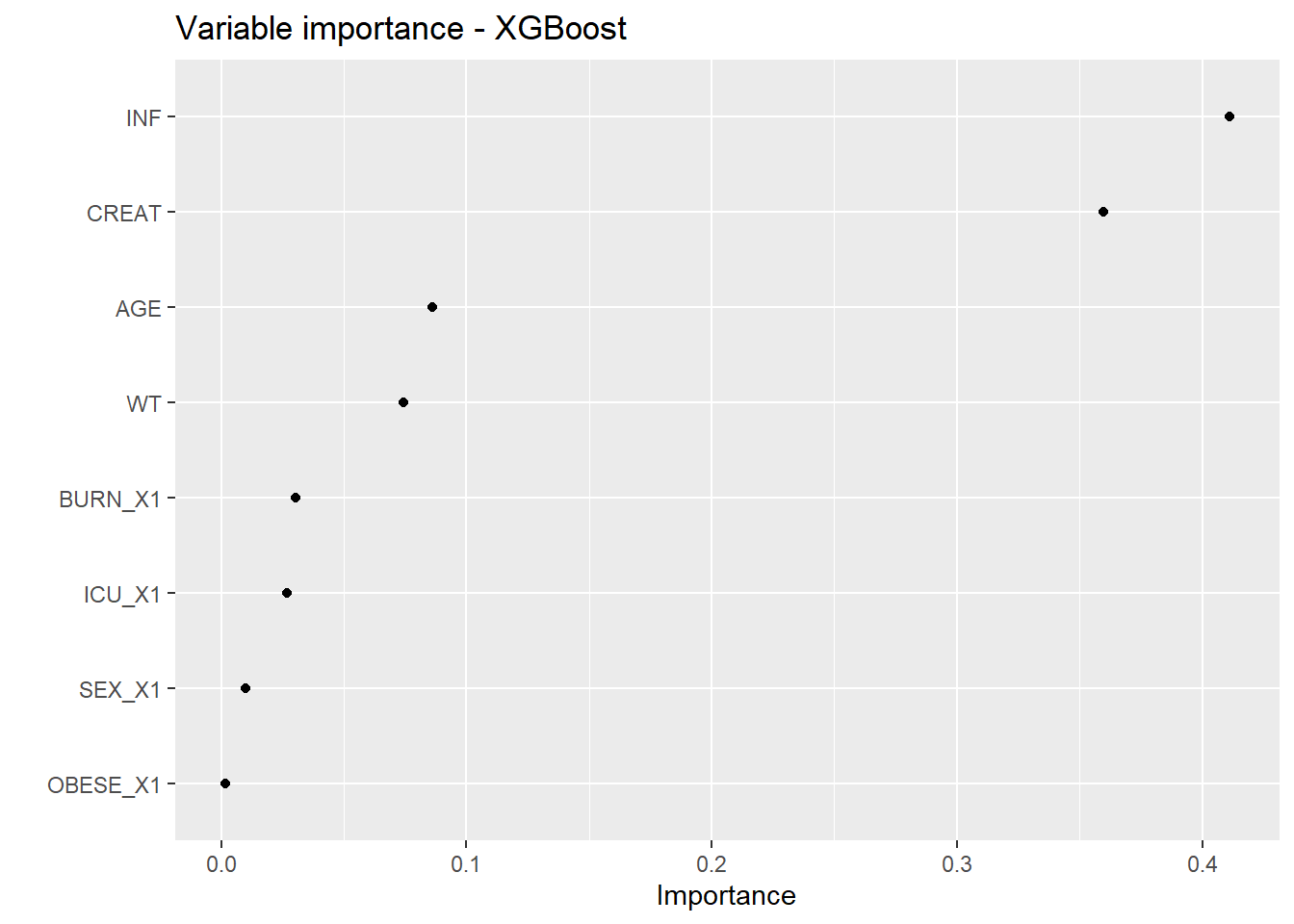
ggsave(filename = here("Figures/S16a.jpg"),
       plot = XGB_VIP,
       width = 8, height = 6, dpi = 600)

final_xgb_fit <- XGB_results$final_xgb_fittest_XGB <- openMIPD::xgb_test(final_fit = final_xgb_fit, test = test_preprocessed)ta_results_XGB <- explore_predictions(data = test_XGB, DOSE_PRED = "XGBoost")
ta_results_XGB$target_attainment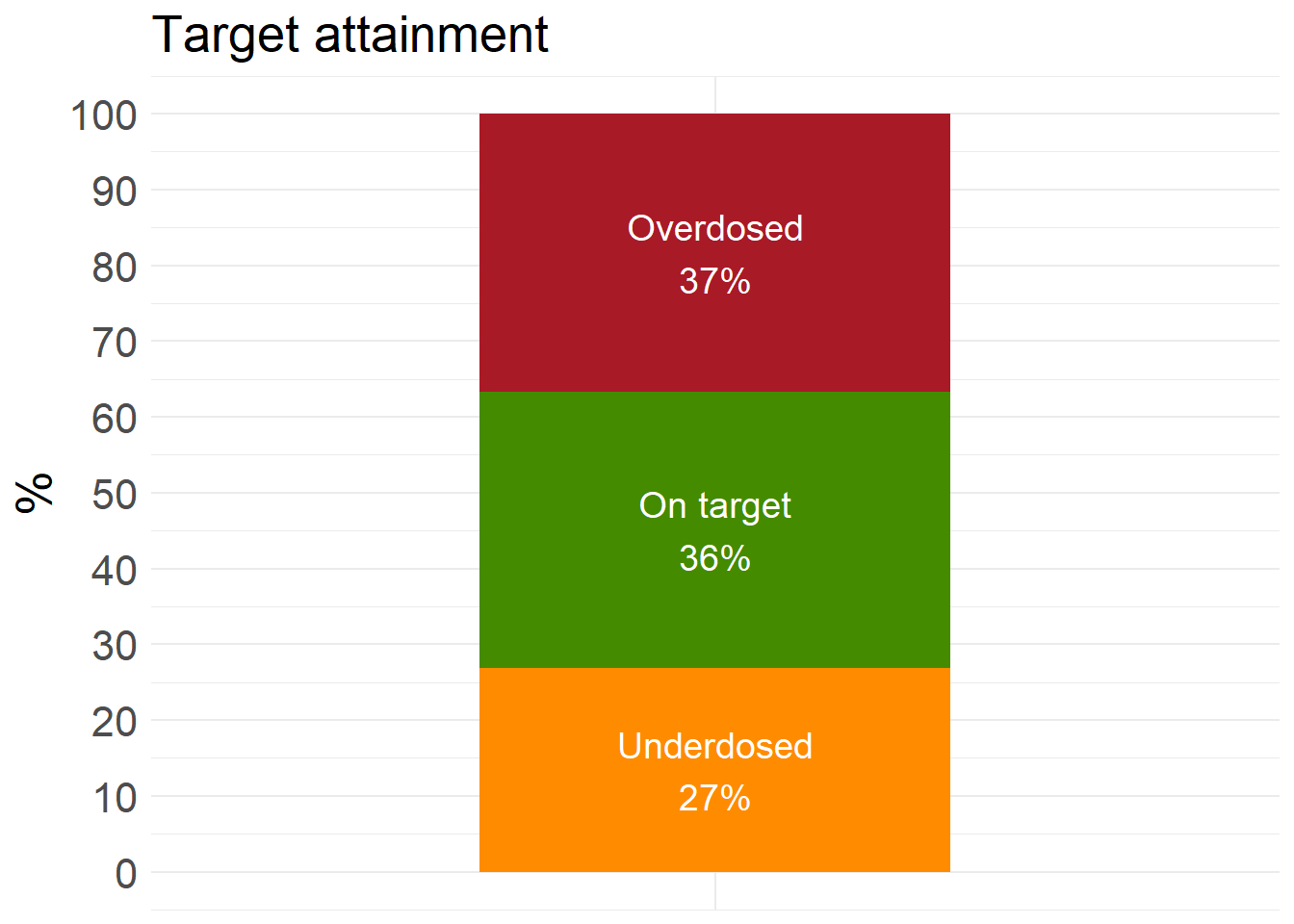
ta_results_XGB$summary_stats# A tibble: 2 × 10
Prediction_correctness Count Obese mean_CREAT sd_CREAT mean_WT sd_WT mean_AGE
<chr> <int> <int> <dbl> <dbl> <dbl> <dbl> <dbl>
1 Correct 219 77 1.01 0.560 83.5 18.2 62.1
2 Incorrect 381 140 0.917 0.587 84.9 19.0 58.6
# ℹ 2 more variables: sd_AGE <dbl>, Proportion <dbl>A decision tree is a model that represents possible decision paths in a schematic tree-like structure. In regression trees, node splitting is done to minimize intra-group variance. In classification trees, node purity can be measured using the Gini index, where f is the frequency of observations:
\[ \text{Gini index} = 2 \cdot f \cdot (1 - f) \]
Introduced in 2001, Random Forest (RF) is a machine learning method based on an ensemble of decision trees. It uses the bootstrap aggregating algorithm (commonly known as bagging). The performance of an RF model is measured by prediction error, which corresponds to the mean squared error (MSE) for regression problems. Random Forest helps reduce variance, making it suitable for unstable, unbiased data.
Hyperparameters to define:
Number of trees (typically around 400)
mtry – the number of variables considered at each node. Default value is \(\sqrt{\text{number of predictors}}\)
Number of observations in the terminal node (leaf)
RF_results <- openMIPD::rf_train(train = train_preprocessed, continuous_cov = c("WT", "CREAT", "AGE", "INF"), categorical_cov = c("BURN", "OBESE", "SEX", "ICU"))A variable importance plot is generated which show the contribution of different predictors to the results. Also, the tuning and hyperparameter optimization is visualized.
RF_results$tune_plot_rf # tuning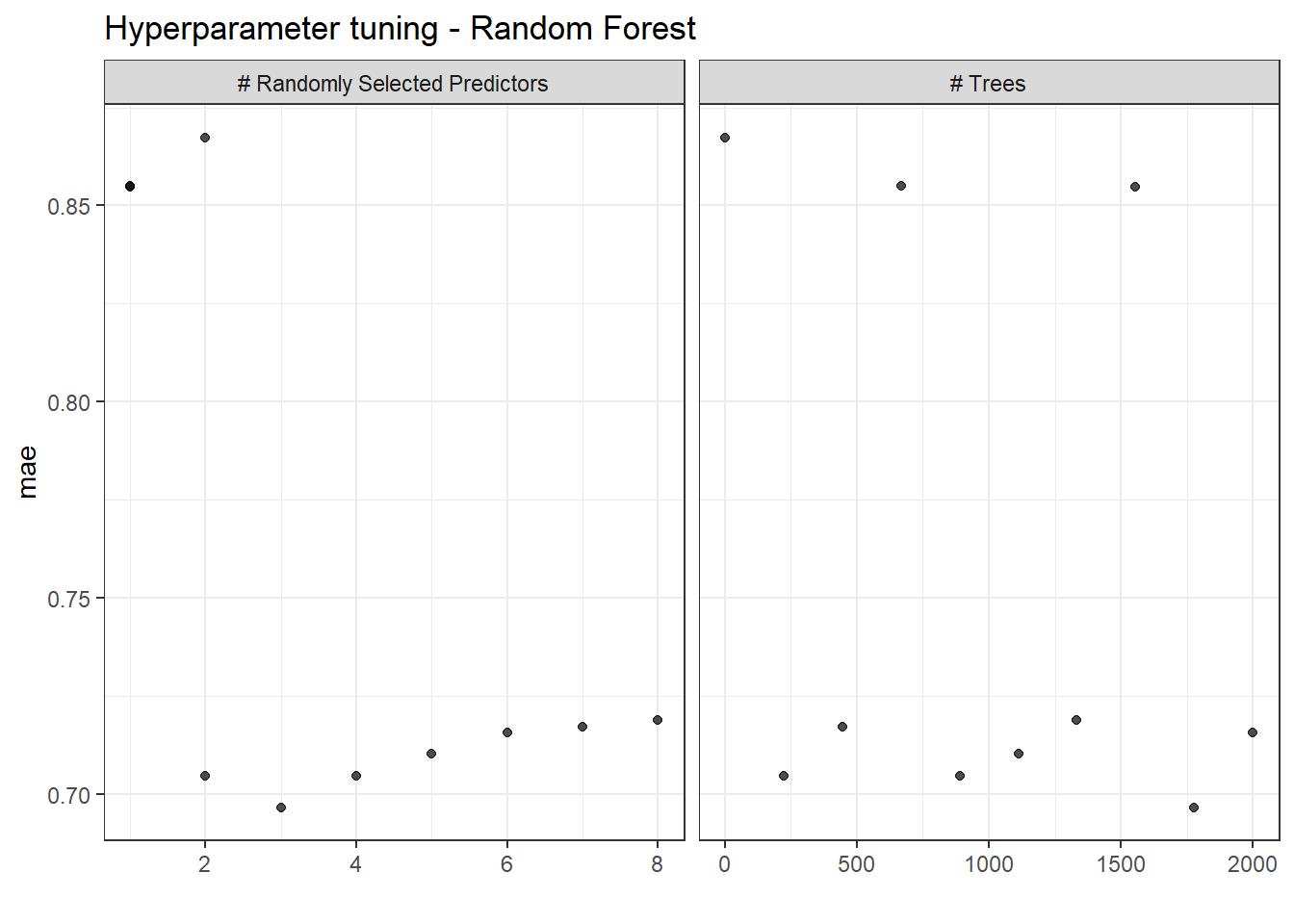
RF_results$final_wf_rf # optimized hyperparameters══ Workflow ════════════════════════════════════════════════════════════════════
Preprocessor: Recipe
Model: rand_forest()
── Preprocessor ────────────────────────────────────────────────────────────────
2 Recipe Steps
• step_mutate_at()
• step_dummy()
── Model ───────────────────────────────────────────────────────────────────────
Random Forest Model Specification (regression)
Main Arguments:
mtry = 3
trees = 1777
Engine-Specific Arguments:
importance = impurity
Computational engine: ranger RF_VIP <- RF_results$rf_vip # variable importance plot
RF_VIP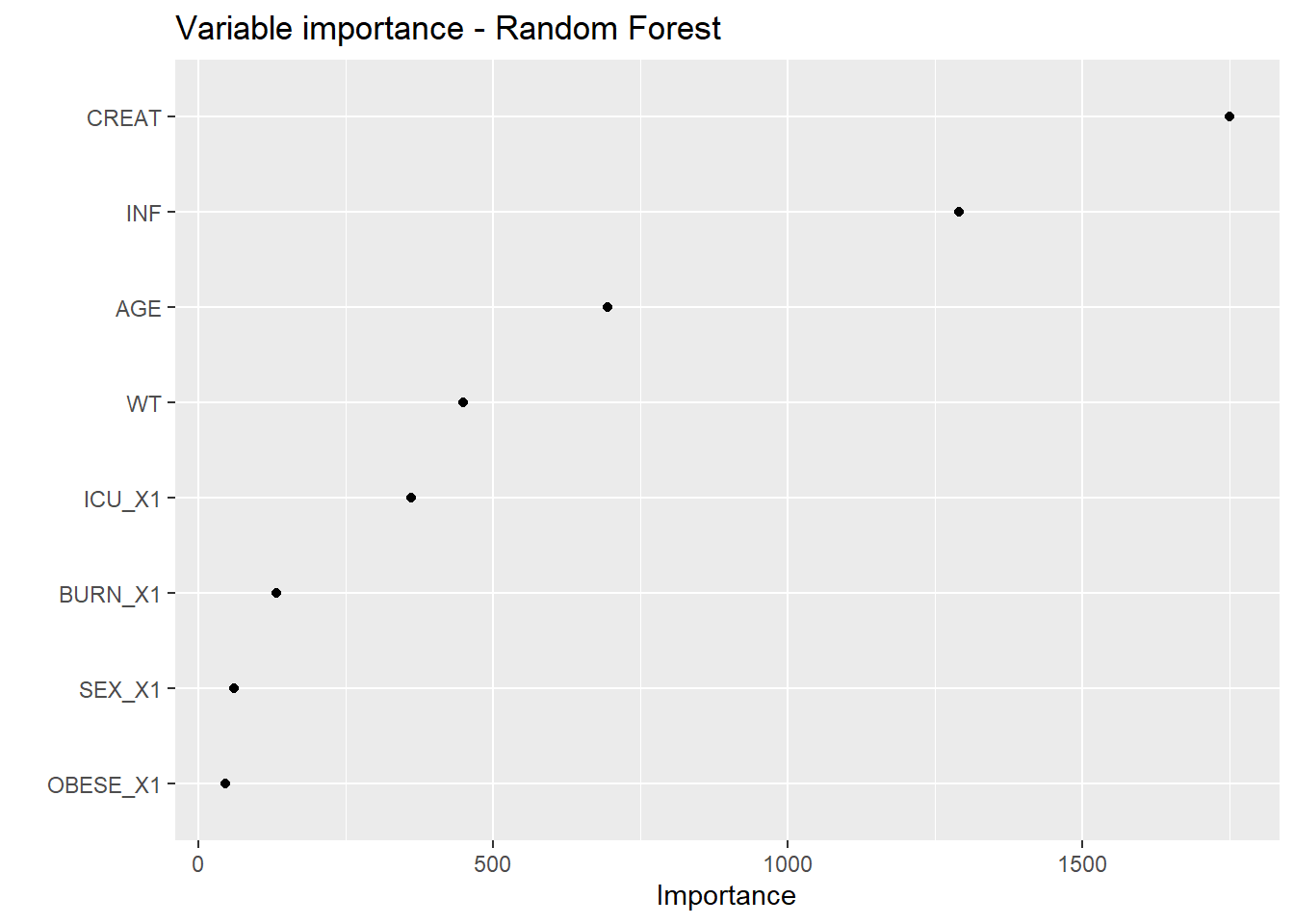
ggsave(filename = here("Figures/S16b.jpg"),
       plot = RF_VIP,
       width = 8, height = 6, dpi = 600)
final_rf_fit <- RF_results$final_rf_fittest_RF <- openMIPD::rf_test(final_fit = final_rf_fit, test = test_preprocessed)ta_results_RF <- explore_predictions(test_RF, DOSE_PRED = "RF")
ta_results_RF$target_attainment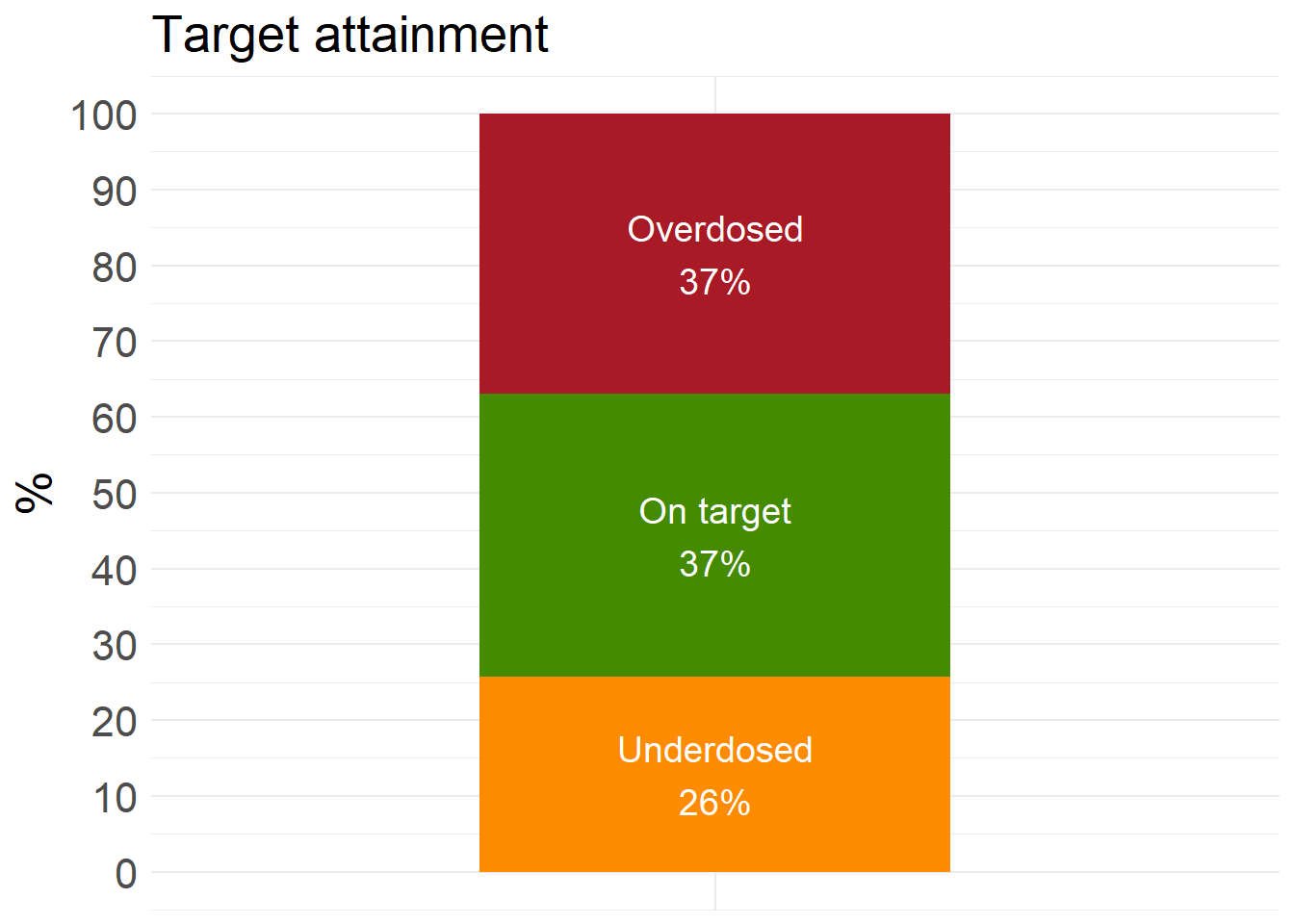
ta_results_RF$summary_stats# A tibble: 2 × 10
Prediction_correctness Count Obese mean_CREAT sd_CREAT mean_WT sd_WT mean_AGE
<chr> <int> <int> <dbl> <dbl> <dbl> <dbl> <dbl>
1 Correct 224 69 1.03 0.589 82.0 17.9 63.2
2 Incorrect 376 148 0.905 0.569 85.8 19.0 58.0
# ℹ 2 more variables: sd_AGE <dbl>, Proportion <dbl>Introduced in 1995, Support Vector Machines (SVM) classify data by finding a hyperplane that maximizes the distance between classes in a multi-dimensional space. SVM regression predicts a continuous target by fitting a function with a tolerance for small deviations from the true values and penalizing large errors. SVM regression can capture non-linear relationships and is less sensible to outliers compared to linear regression. Unlike K-Nearest Neighbors (KNN), SVM is effective for high-dimensional data.
Cost – regularization parameter that determines the weight given to classification errors. If cost increases, tolerance for classification errors decreases. A smaller cost improves generalizability.
σ – controls the shape of the decision boundary. A smaller value captures local trends better but may lead to overfitting and reduced generalizability.
SVM_results <- openMIPD::svm_train(train = train_preprocessed, continuous_cov = c("WT", "CREAT", "AGE", "INF"), categorical_cov = c("BURN", "OBESE", "SEX", "ICU"))SVM_results$tune_plot_svm # tuning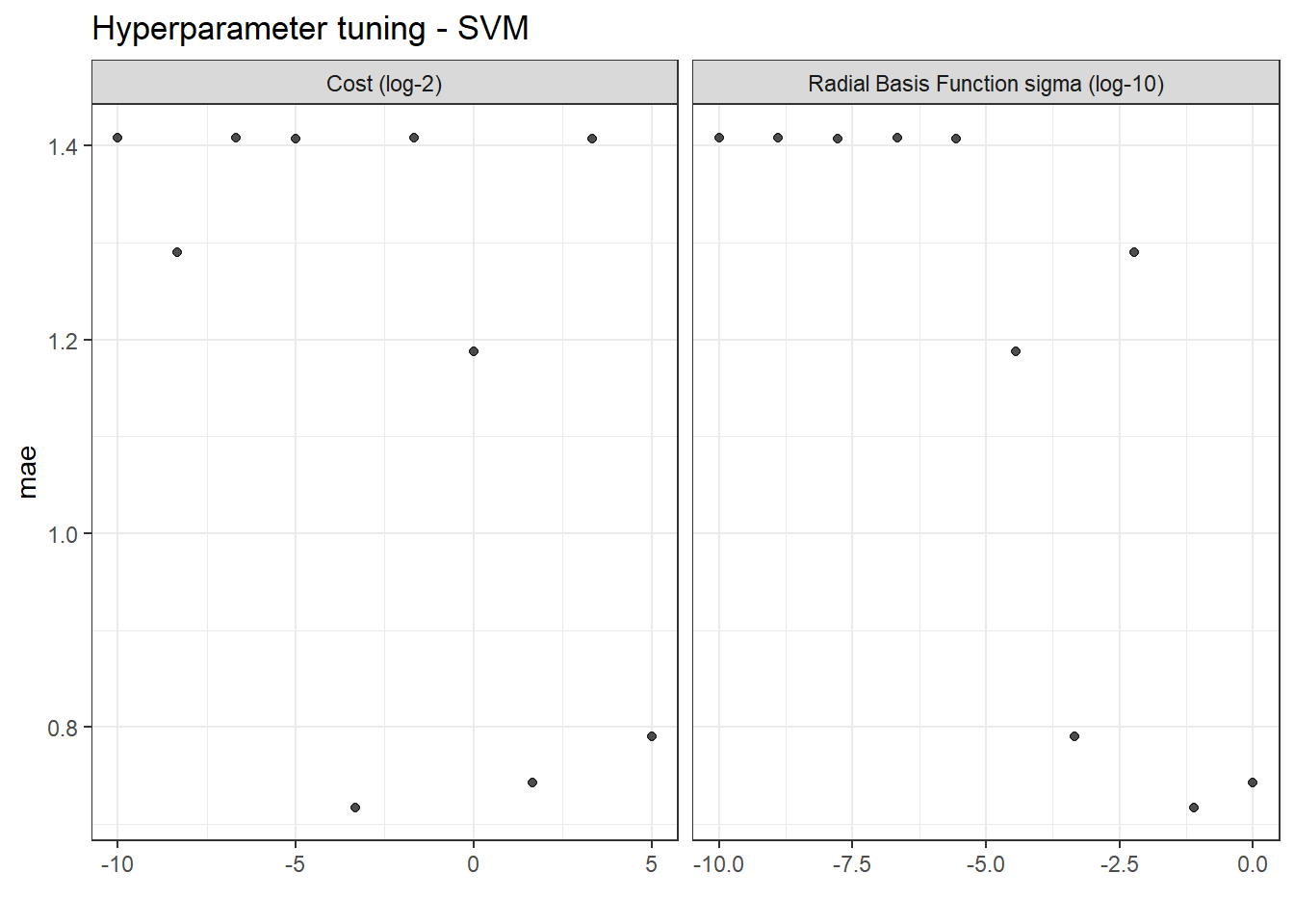
SVM_results$final_wf_svm # optimized hyperparameters══ Workflow ════════════════════════════════════════════════════════════════════
Preprocessor: Recipe
Model: svm_rbf()
── Preprocessor ────────────────────────────────────────────────────────────────
3 Recipe Steps
• step_mutate_at()
• step_dummy()
• step_normalize()
── Model ───────────────────────────────────────────────────────────────────────
Radial Basis Function Support Vector Machine Model Specification (regression)
Main Arguments:
cost = 0.0992125657480125
rbf_sigma = 0.0774263682681128
Computational engine: kernlab final_svm_fit <- SVM_results$final_svm_fittest_SVM <- openMIPD::svm_test(final_fit = final_svm_fit, test = test_preprocessed)ta_results_SVM <- explore_predictions(test_SVM, DOSE_PRED = "SVM")
ta_results_SVM$target_attainment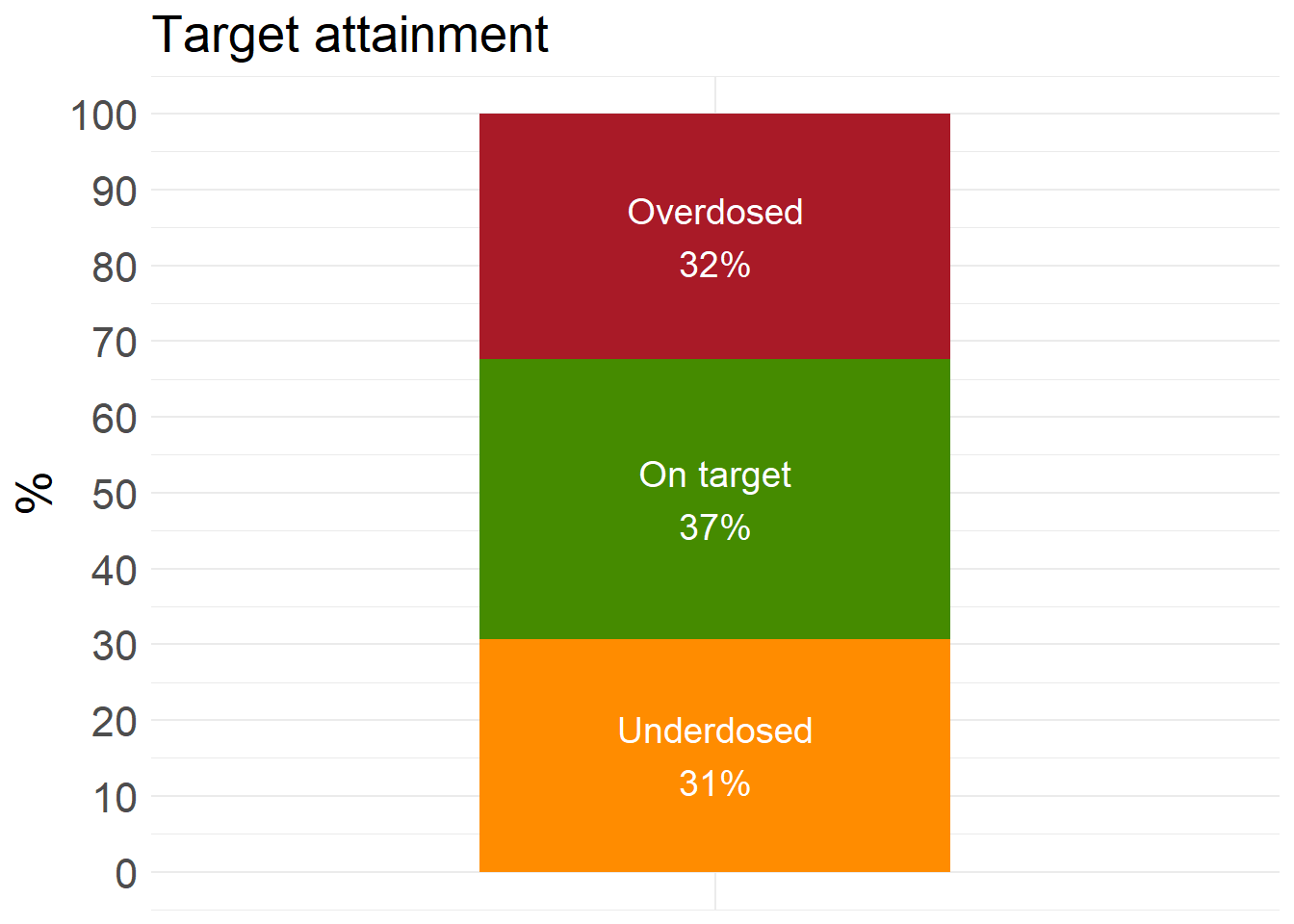
ta_results_SVM$summary_stats# A tibble: 2 × 10
Prediction_correctness Count Obese mean_CREAT sd_CREAT mean_WT sd_WT mean_AGE
<chr> <int> <int> <dbl> <dbl> <dbl> <dbl> <dbl>
1 Correct 222 84 0.987 0.543 84.7 19.2 61.3
2 Incorrect 378 133 0.929 0.598 84.2 18.4 59.1
# ℹ 2 more variables: sd_AGE <dbl>, Proportion <dbl>KNN is a simple, non-parametric algorithm that is less sensitive to outliers and is used to create clusters and make predictions based on the similarity of data points. The disadvantage of KNN is that the algorithm can take a long time to run, and it is less suited for high-dimensional data.
The value of k is determined through 10-fold cross-validation.
The distance is calculated between all data points and the target point.
The k nearest neighbors are selected.
The average of the target values of these nearest neighbors will be the prediction for the given point.
The most commonly used distance metrics are as follows:
Euclidean Distance: The most commonly used; a straight line connecting two points in vector space. This distance is well-suited for outliers and noise but less suitable for data with different scales or high dimensionality. \[ d(x, y) = \sqrt{(x - y)^2} \]
Manhattan Distance: Well-suited for categorical data and high-dimensional data. It is less suitable for data with different scales.
\[ d(x, y) = |x - y| \]
\[ d(x, y) = \left| (x - y)^p \right|^{1/p} \]
Euclidean distance is the default distance used and it is the most interpretable and intuitive. Hyperparameters to define:
k
p (if Minkowski distance is used)
KNN_results <- openMIPD::knn_train(train = train_preprocessed, continuous_cov = c("WT", "CREAT", "AGE", "INF"), categorical_cov = c("BURN", "OBESE", "SEX", "ICU"))KNN_results$tune_plot_knn # tuning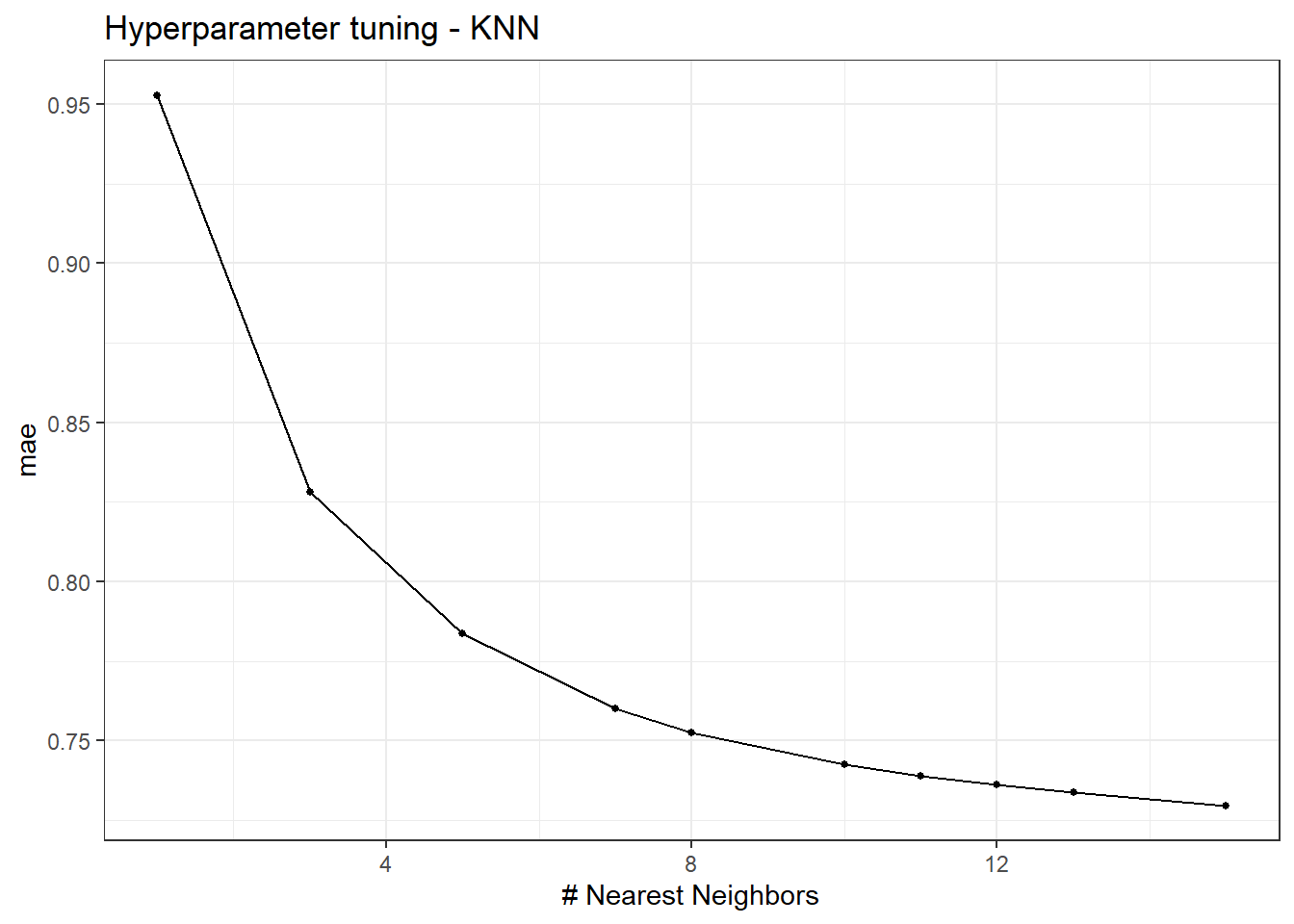
KNN_results$final_wf_knn # optimized hyperparameters══ Workflow ════════════════════════════════════════════════════════════════════
Preprocessor: Recipe
Model: nearest_neighbor()
── Preprocessor ────────────────────────────────────────────────────────────────
3 Recipe Steps
• step_mutate_at()
• step_dummy()
• step_normalize()
── Model ───────────────────────────────────────────────────────────────────────
K-Nearest Neighbor Model Specification (regression)
Main Arguments:
neighbors = 15
Computational engine: kknn final_knn_fit <- KNN_results$final_knn_fittest_KNN <- openMIPD::knn_test(final_fit = final_knn_fit, test = test_preprocessed)ta_results_KNN <- explore_predictions(test_KNN, DOSE_PRED = "KNN")
ta_results_KNN$target_attainment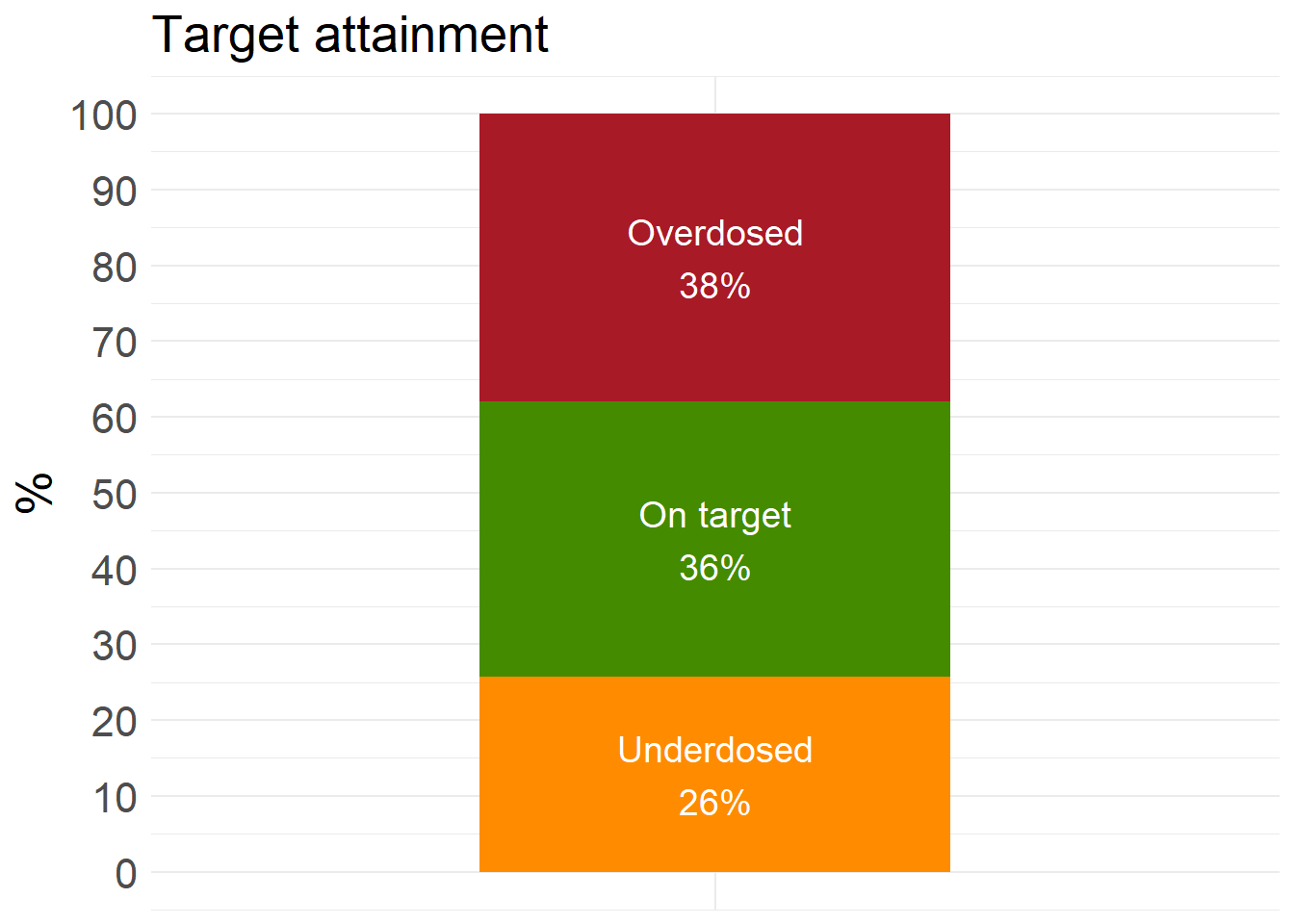
ta_results_KNN$summary_stats# A tibble: 2 × 10
Prediction_correctness Count Obese mean_CREAT sd_CREAT mean_WT sd_WT mean_AGE
<chr> <int> <int> <dbl> <dbl> <dbl> <dbl> <dbl>
1 Correct 218 77 1.02 0.621 82.8 19.5 62.8
2 Incorrect 382 140 0.909 0.550 85.3 18.2 58.3
# ℹ 2 more variables: sd_AGE <dbl>, Proportion <dbl>The blend_predictions function determines how member model output will ultimately be combined in the final prediction by fitting a Lasso model on the data stack, predicting the true assessment set outcome using the predictions from each of the candidate members. Candidates with nonzero stacking coefficients become members.
These plots the meta-learning model over a predefined grid of lasso penalty values and uses an internal resampling method to determine the best value. The autoplot() method, shown helps us understand if the default penalization method was sufficient. It can also be used to visualize the contribution of each model type.
amox_cmin <- stacks() %>%
    add_candidates(XGB_results$tune_res_xgb) %>%
    add_candidates(SVM_results$tune_res_svm) %>%
    add_candidates(RF_results$tune_res_rf) %>%
    add_candidates(KNN_results$tune_res_knn)

  conflicted::conflicts_prefer(brulee::coef)

  set.seed(1234)
  amox_cmin_ens <- amox_cmin %>% blend_predictions()

  # fit ensembled members
  set.seed(1234)
  amox_cmin_ens <- amox_cmin_ens %>% fit_members()
To evaluate training, the evolution of metrics with the number of members and the contribution of different stacking members are plotted.
  # Stacking plots
  stacking_autoplot_default <- autoplot(amox_cmin_ens)
  stacking_members_plot <- autoplot(amox_cmin_ens, type = "members")
  stacking_weights_plot <- autoplot(amox_cmin_ens, type = "weights")
  ggsave(filename = here("Figures/S17.jpg"),
       plot = stacking_weights_plot,
       width = 8, height = 6, dpi = 600)

  stacking_autoplot_default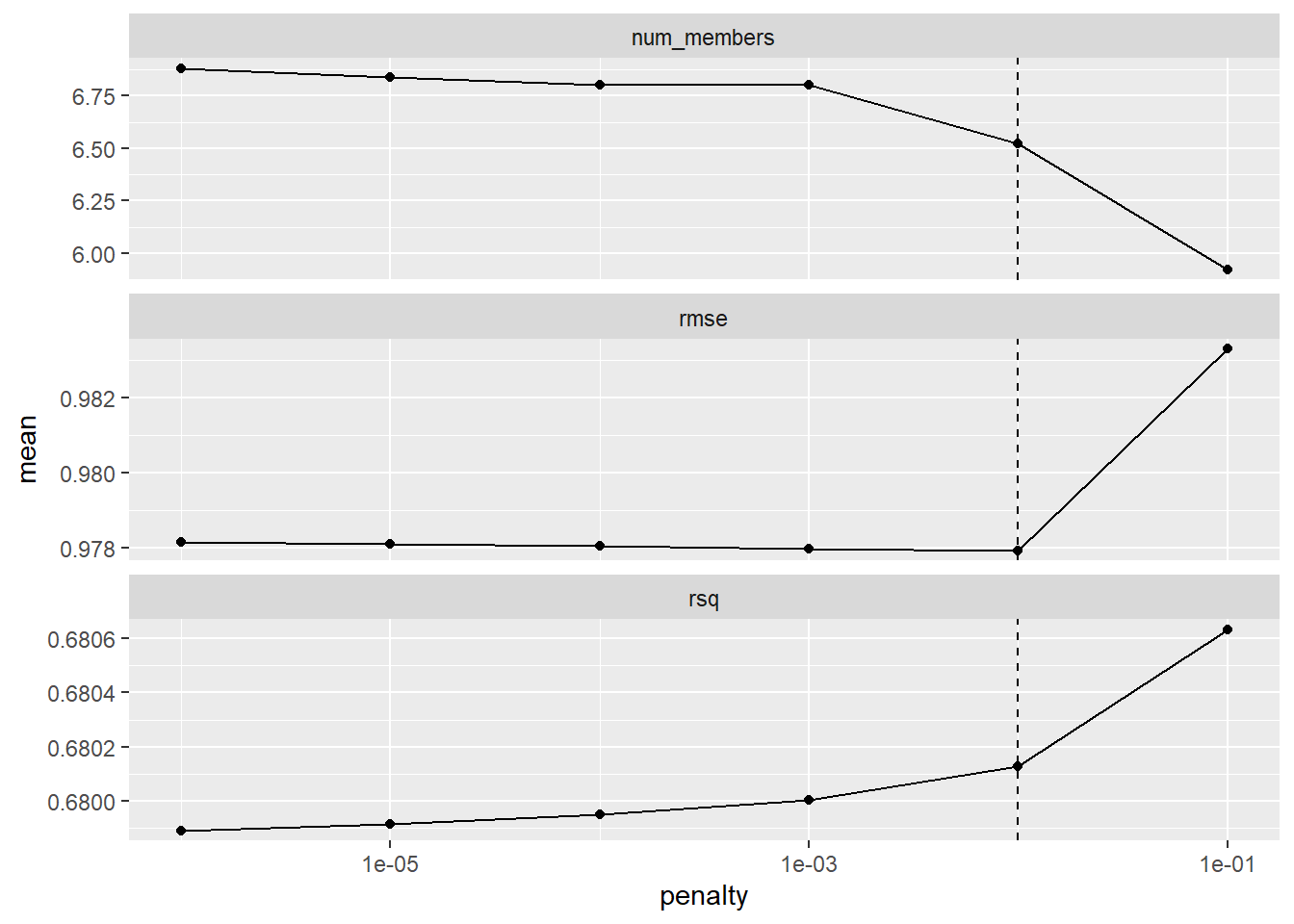
stacking_members_plot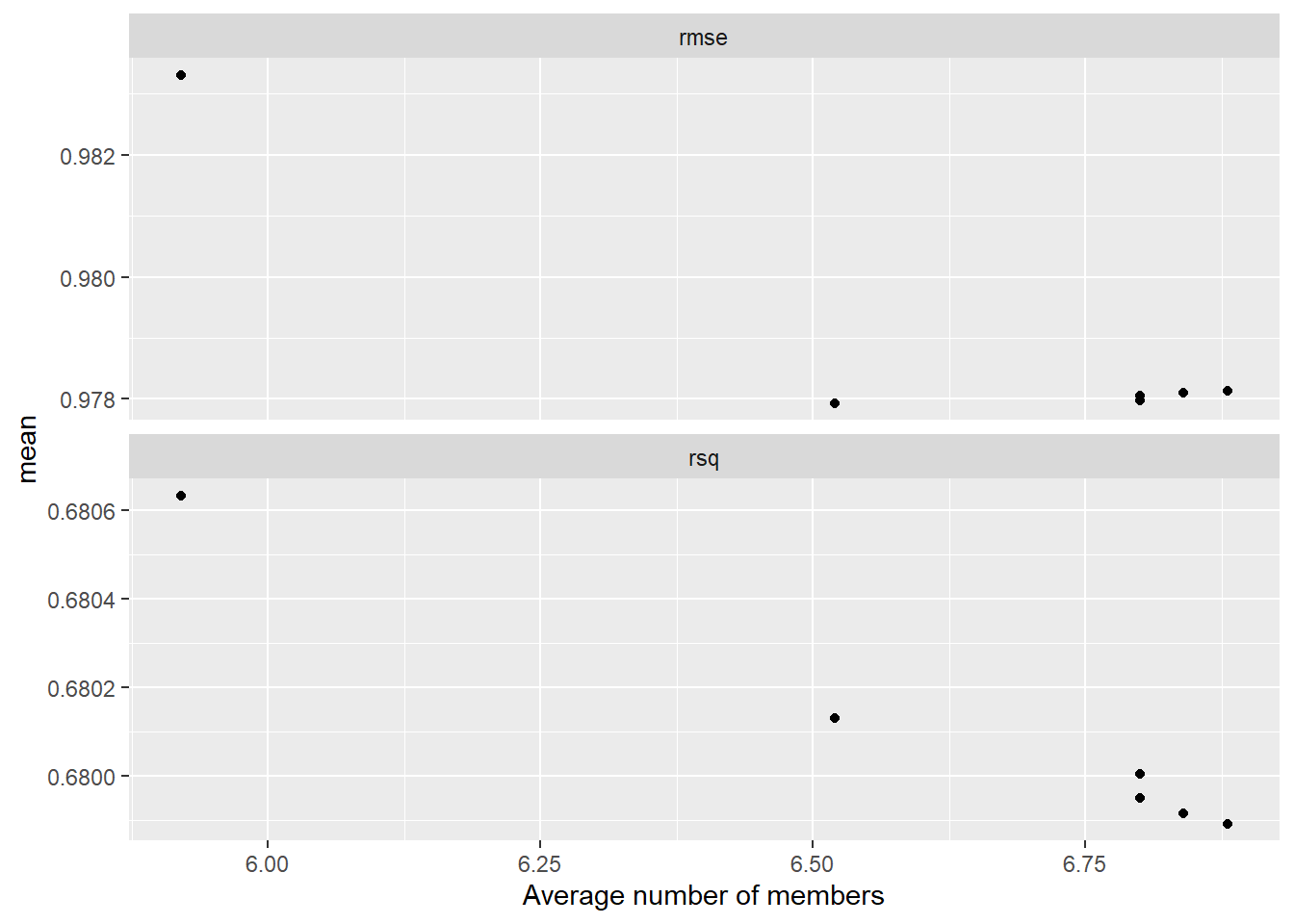
stacking_weights_plot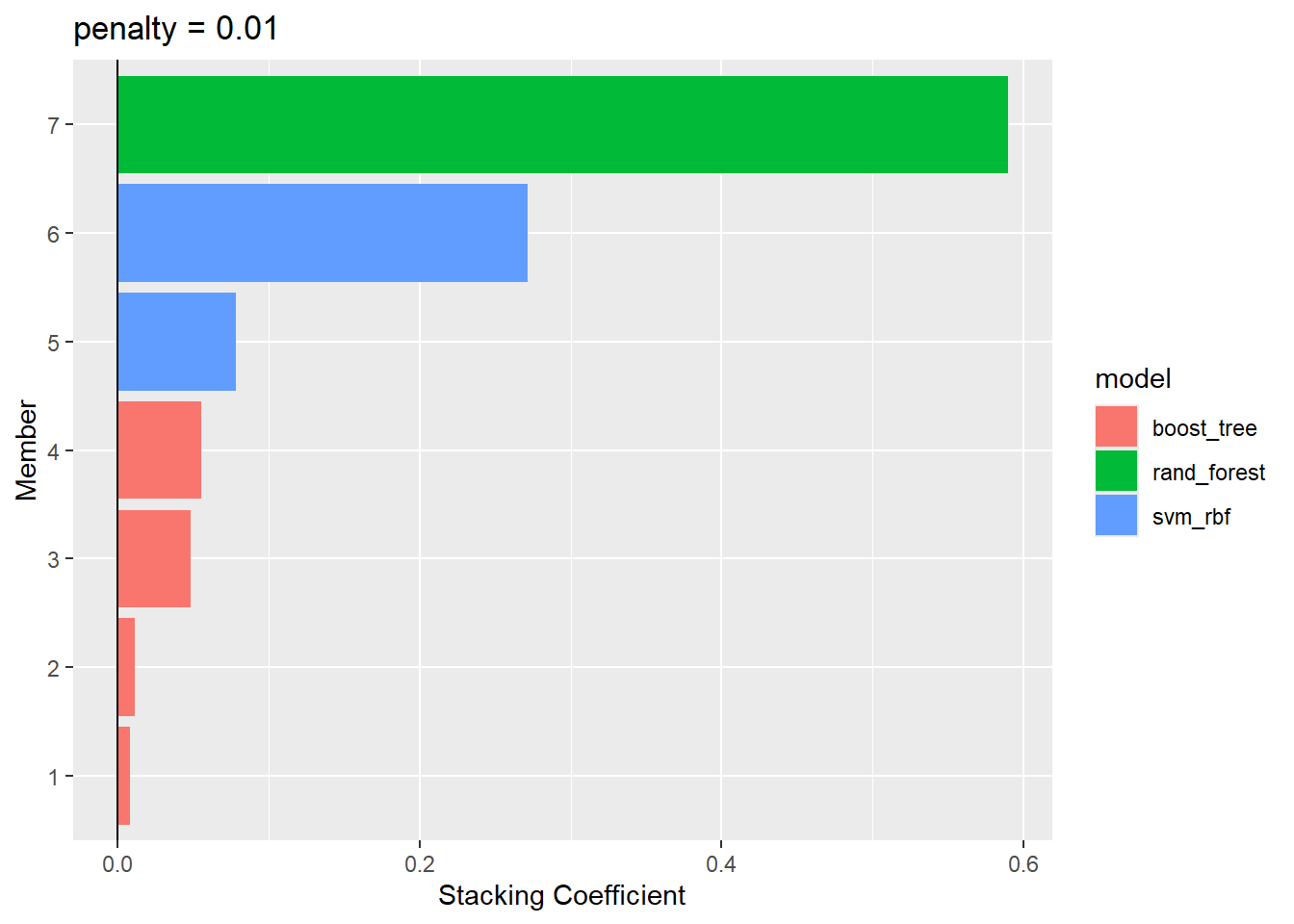
  # Make predictions with stacking
  stack_preds <- predict(amox_cmin_ens, new_data = test_preprocessed) %>%
    dplyr::pull(.pred)
Target attainment and corresponding statistics are calculated for the predictions.
  # Add stacking to the test table
  test_STACK <- test_preprocessed %>%
    dplyr::mutate(
      STACK = exp(stack_preds) * (II / 24)
    )

ta_results_STACK <- explore_predictions(test_STACK, DOSE_PRED = "STACK")
ta_results_STACK$target_attainment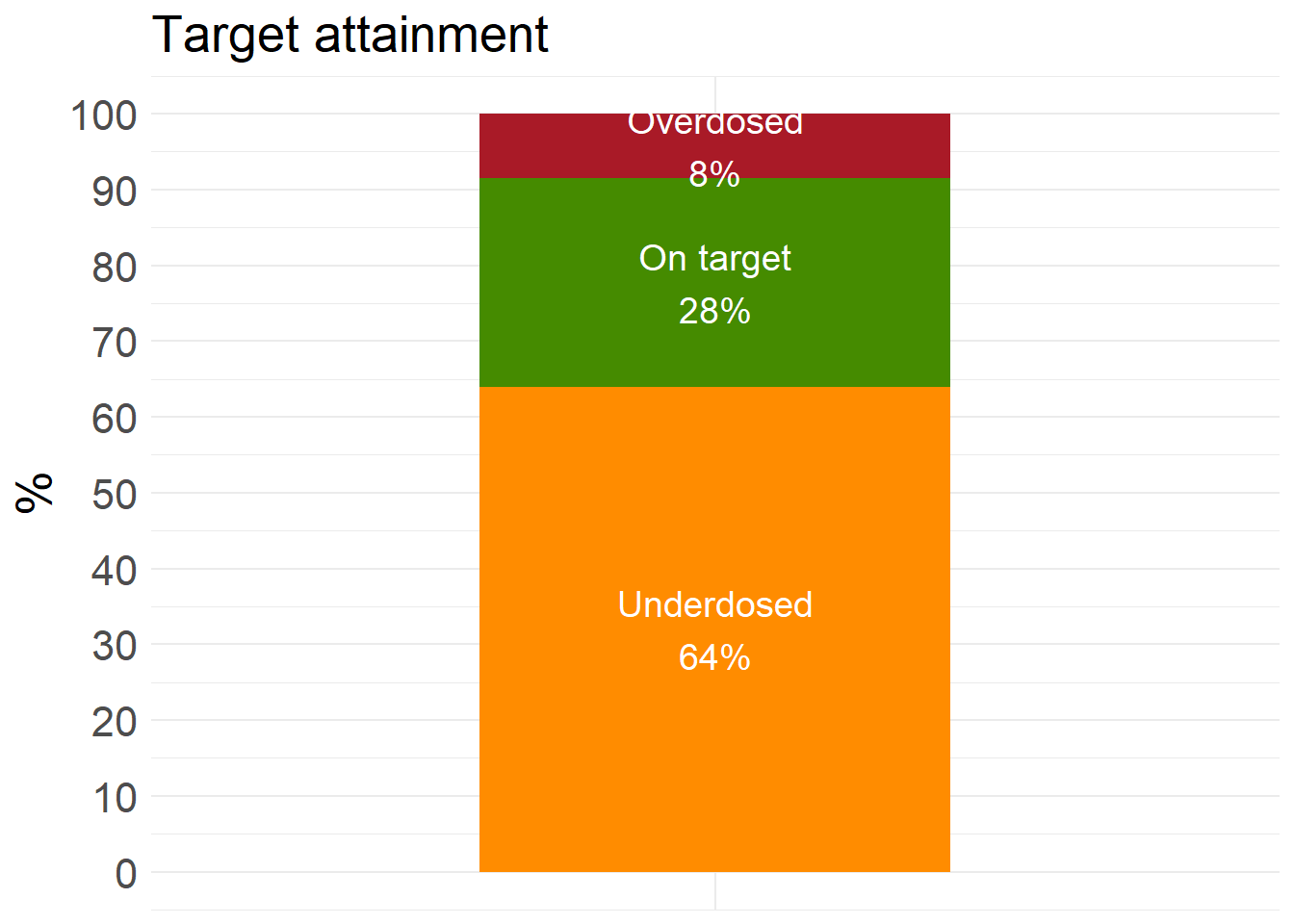
ta_results_STACK$summary_stats# A tibble: 2 × 10
Prediction_correctness Count Obese mean_CREAT sd_CREAT mean_WT sd_WT mean_AGE
<chr> <int> <int> <dbl> <dbl> <dbl> <dbl> <dbl>
1 Correct 165 51 0.983 0.555 80.5 16.7 66.2
2 Incorrect 435 166 0.938 0.588 85.9 19.2 57.5
# ℹ 2 more variables: sd_AGE <dbl>, Proportion <dbl>